
Why Virtual Meeting Etiquette Matters More Than Ever
Virtual meeting etiquette has become essential for real estate professionals as remote consultations, team meetings, and client presentations have shifted online. Whether you’re conducting a buyer consultation, hosting a team strategy session, or presenting market analysis to investors, your digital presence directly impacts client perception and business success.
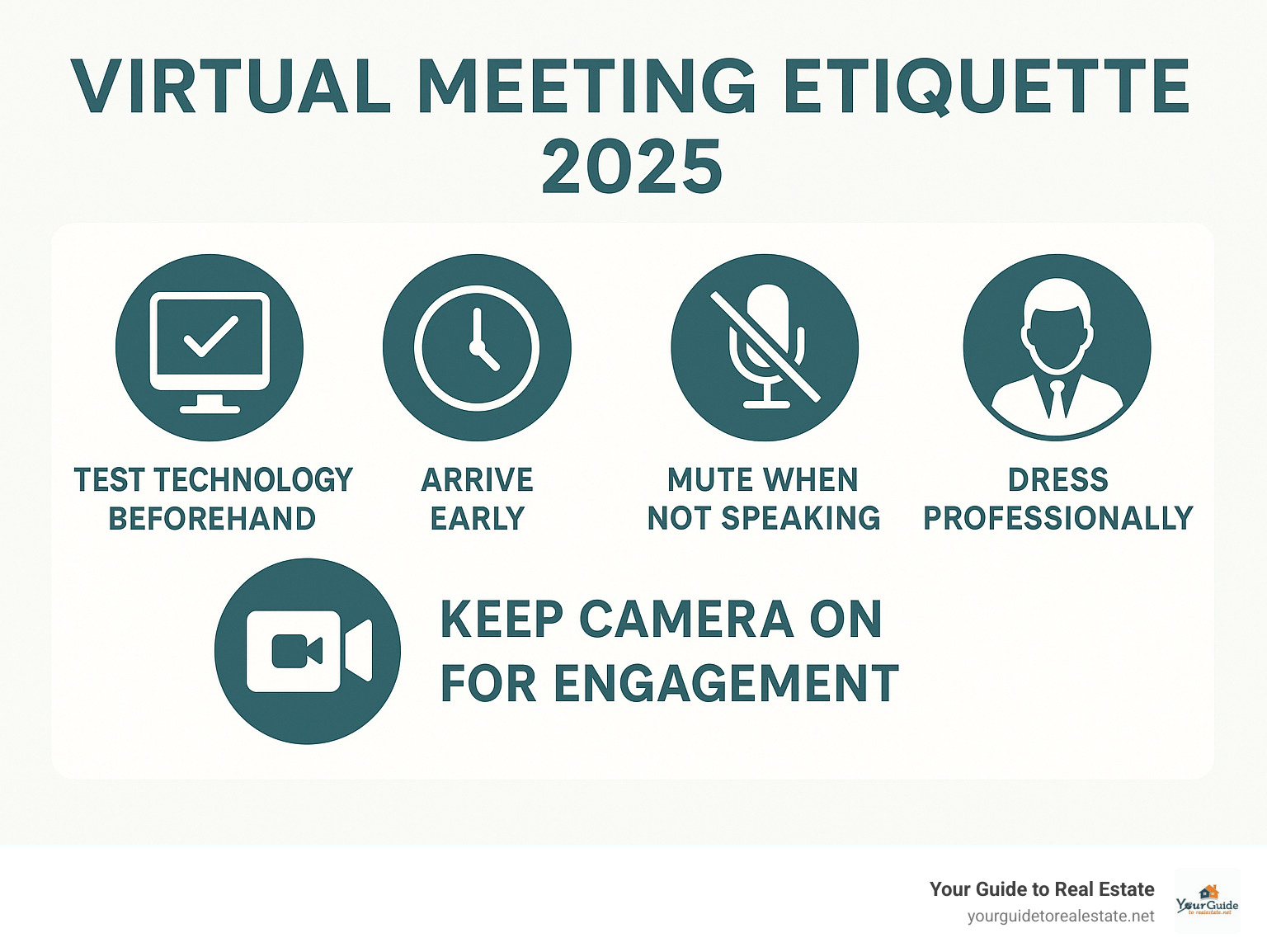
Essential Virtual Meeting Etiquette Rules:
- Test your technology – Check camera, microphone, and internet connection before joining
- Arrive on time – Join 2-5 minutes early to avoid disruptions
- Mute when not speaking – 70% of people say background noise is the most disruptive element
- Keep your camera on – Maintain visual connection and show engagement
- Dress professionally – Present yourself as you would for an in-person meeting
- Use a clean background – Ensure your space looks professional and distraction-free
- Stay focused – Avoid multitasking and give your full attention to participants
The stakes are high in today’s remote-first world. Research shows that 90% of people agree that virtual meeting etiquette is important for professional success, yet 60% admit to multitasking during virtual meetings. This disconnect creates a competitive advantage for real estate professionals who master these digital communication skills.
Poor virtual meeting etiquette can damage client relationships, reduce team productivity, and hurt your professional reputation. Conversely, excellent digital presence builds trust, demonstrates professionalism, and sets you apart from competitors who haven’t adapted to remote communication standards.
In real estate, where relationships and trust are everything, your virtual meeting skills directly impact your ability to close deals, retain clients, and build lasting professional partnerships.
Before the Call: Preparation is Key (Steps 1-3)
Think about the last time you showed a property without checking if the lights worked or the door was open uped. Pretty stressful, right? The same principle applies to virtual meeting etiquette – your success depends entirely on what happens before you even click “join.”
Just like preparing for an open house, successful virtual meetings require thoughtful preparation. The difference is that now your technology, environment, and mindset all need to be camera-ready. This preparation phase is where many real estate professionals either shine or stumble, and it’s a crucial part of developing strong Real Estate Agent Skills in our digital-first world.
Let’s walk through the three essential steps that will set you up for virtual meeting success.
Step 1: Conduct Essential Technical Checks
Picture this: You’re about to present a market analysis to potential sellers, and your microphone decides to take a coffee break. Or your camera makes you look like you’re broadcasting from the bottom of a fish tank. These technical hiccups don’t just cause embarrassment – they can cost you clients.
Your tech check should become as routine as grabbing your keys before leaving the house. Start by testing your camera to make sure the image is clear and you’re properly framed. Then check your microphone – does your voice come through clearly, or do you sound like you’re talking through a tunnel? Don’t forget to test your speakers or headphones too.
Your internet connection deserves special attention. A shaky connection can turn a smooth presentation into a frustrating game of “Can you hear me now?” Test your speed beforehand, especially if you’re sharing your screen or presenting visual content.

Update your meeting software ahead of time – nothing kills momentum like waiting for a software update when your meeting should be starting. While you’re at it, learn some basics of Zoom shortcuts. Knowing how to quickly mute yourself (Alt+A on Windows, Command+Shift+A on Mac) or toggle your video (Alt+V on Windows, Command+Shift+V on Mac) makes you look polished and prepared.
Always have a backup plan. Technology loves to fail at the worst possible moment. Keep your phone handy so you can dial in for audio if your computer microphone fails. If you’re in an area with spotty internet, consider having a mobile hotspot ready. These small preparations show clients and colleagues that you’re a professional who thinks ahead.
Step 2: Curate Your Professional Environment
Your virtual background is now part of your professional brand. Just as you wouldn’t meet clients in a cluttered office, your virtual space should reflect the same level of professionalism you’d bring to any in-person meeting.
Start with finding your quiet zone. Background noise tops the list of virtual meeting disruptions, with 70% of people citing it as their biggest frustration. This means having a conversation with family members or roommates about your meeting schedule, and maybe putting a friendly “Do Not Disturb” sign on your door.
We all love our pets, but Fluffy’s surprise cameo during a serious negotiation might not land the way you hope. The same goes for children – while the occasional interruption is understandable, planning ahead helps maintain your professional image.
Your background should be clean, simple, and distraction-free. Position yourself against a plain wall or ensure any visible areas look tidy and organized. Good lighting makes a huge difference – face a window or light source so clients can see you clearly. Poor lighting can make you look unprofessional or hard to see, which doesn’t inspire confidence in your expertise.

Virtual backgrounds can be your friend – if you use them wisely. Most platforms offer blur options or professional backdrops that can hide a less-than-perfect space. Test these beforehand to avoid any awkward green-screen moments. For real estate professionals, a subtle virtual background of a well-staged room can actually reinforce your brand. Think of it as giving clients a mini Virtual Reality Home Tour of your professional standards.
Step 3: Arrive Early and Review the Agenda
In real estate, timing is everything. Being late to a listing appointment sends the wrong message, and the same applies to virtual meetings. Arriving 5 minutes early to any virtual meeting should be your standard practice.
This buffer time serves multiple purposes. It gives you a chance to resolve any last-minute technical issues, settle into your space, and mentally prepare for the discussion ahead. Early arrival also shows respect for everyone else’s time – something that matters even more when people are juggling back-to-back virtual meetings all day.
Before you even join the call, review the meeting agenda thoroughly. If there isn’t one, don’t hesitate to ask for it. An agenda acts as your roadmap, helping you understand the meeting’s purpose and prepare relevant talking points or questions. This preparation allows you to contribute meaningfully rather than just showing up and hoping for the best.
Preparation also means eliminating distractions. Close unnecessary browser tabs, silence your phone notifications, and turn off computer alerts. 60% of people admit to multitasking during virtual meetings, but this habit severely undermines your ability to engage effectively. By giving the meeting your full attention, you stand out as someone who takes professional interactions seriously.
If you find yourself struggling to manage your time effectively across multiple virtual meetings, consider using a time-tracking tool to help you stay organized and ensure you’re always prepared for your next virtual engagement. Good virtual meeting etiquette starts with good time management, and both are essential skills for today’s real estate professional.
During the Call: Mastering Your On-Screen Presence (Steps 4-6)
Now that you’ve set the stage with perfect preparation, it’s time to shine during the actual meeting. This is where your virtual meeting etiquette skills truly come to life. Think of this as your moment to demonstrate active participation, clear communication, and genuine professionalism.
In today’s digital-first world, especially as How AI and Automation Are Changing the Real Estate Workforce in 2025 continues reshaping our industry, mastering your on-screen presence isn’t just helpful – it’s essential for success.
Step 4: Perfect Your Professional Appearance
Here’s the thing about virtual meetings: even though you’re at home, your appearance still speaks volumes about your professionalism. Just like you wouldn’t show up to a client listing appointment in pajamas, virtual meeting etiquette calls for the same professional standards online.
Dress for success, even from your home office. You don’t need a three-piece suit, but business casual shows you take the meeting seriously. There’s actually science behind this – research shows that getting dressed for work helps shift your mindset from casual home mode to professional work mode. It’s like flipping a mental switch.

Grooming matters too. Make sure your hair looks presentable and you appear put-together. While 80% of people might think it’s okay to turn off video for a “bad hair day,” we believe in always putting your best foot forward.
Your body language tells a story even through a computer screen. Sit up straight, maintain good posture, and keep your movements purposeful rather than fidgety. These non-verbal cues communicate confidence and engagement to your clients and colleagues.
Here’s a pro tip: dress completely, even if only your top half is visible. It sounds silly, but wearing proper pants helps you feel more professional and prepared. Trust us on this one!
Step 5: Manage Your Audio, Video, and Focus
This step requires your constant attention throughout the meeting. Getting your audio, video, and personal focus right can make the difference between a smooth, productive call and a frustrating technical disaster.
Audio management starts with one simple rule: mute when you’re not speaking. Background noise disrupts everyone’s concentration, and with 70% of people finding it the most annoying part of virtual meetings, staying muted is just good manners. When it’s your turn to talk, unmute yourself and pause for a second to account for any internet delay before diving in.
Keep your camera on whenever possible. Yes, it might feel awkward at first, but video creates connection and allows for non-verbal communication, which makes up 58 percent of all communication. Your clients and teammates need to see your facial expressions and reactions – it builds trust and rapport.
When you are on camera, look at the camera lens, not just the screen. This creates the impression of eye contact and makes your communication feel more personal and engaging.
Avoid multitasking – and we know this is tough. With 60% of people admitting to doing other tasks during meetings, it’s clearly a widespread challenge. But your full attention shows respect and helps you catch important details you might otherwise miss. Practice active listening by nodding, making appropriate facial expressions, and asking thoughtful questions.
Step 6: Use Communication and Note-Taking Tools
Virtual meeting platforms offer fantastic tools to improve communication – you just need to know how to use them effectively. These features can transform a good meeting into a great one when used properly.
Use the ‘raise hand’ feature instead of interrupting speakers or waiting for awkward pauses. This digital cue keeps conversations flowing smoothly and prevents the dreaded situation where three people start talking at once.
The chat function is your friend for asking questions that don’t need immediate verbal response, sharing relevant links, or making brief comments without derailing the main discussion. Just remember that chat messages, even private ones, are usually visible to meeting hosts, so keep your comments professional.
Take notes strategically. The clicking of keyboard keys can be incredibly distracting if your microphone picks it up. Consider going old-school with pen and paper – it keeps you focused and noise-free.
For a more high-tech approach, try transcription tools like Otter.ai that automatically record and transcribe meetings. This frees you up to actively participate without worrying about capturing every word. It’s like having your own Virtual Real Estate Assistant taking notes for you.
Avoid interrupting others, even if there’s a slight delay in the conversation. Virtual meetings naturally have small pauses as people process information and steer technology. Give speakers time to finish their thoughts before jumping in with your own contributions.
Advanced Virtual Meeting Etiquette for All Roles (Step 7)
As we move deeper into virtual meeting etiquette, it’s important to recognize that successful online meetings aren’t just about individual performance. They’re a team effort that requires thoughtful leadership, clear communication, and a genuine commitment to making everyone feel included. Whether you’re hosting your first virtual client consultation or managing a complex hybrid team meeting, understanding your specific role makes all the difference. Learning how to run an effective meeting in our digital-first world has become an essential skill for real estate professionals.
Step 7: Understand Your Role as a Host or Participant
Every virtual meeting has two distinct roles, each with its own set of responsibilities. As a host or facilitator, you’re essentially the conductor of an orchestra, setting the tone and keeping everyone in harmony. As a participant, you’re a valued member of that orchestra, contributing your expertise while respecting the flow of the meeting.
| Aspect | Host/Facilitator Responsibilities | Participant Responsibilities |
|---|---|---|
| Before the Meeting | Create and share agenda 24 hours in advance; Send calendar invites with clear meeting links; Test all technology and have backup plans ready; Prepare icebreaker questions for new groups | Review agenda thoroughly; Test your own tech setup; Prepare talking points and questions; Arrive 2-5 minutes early |
| During the Meeting | Start on time and welcome everyone warmly; Facilitate introductions and set ground rules; Guide discussion and keep conversations on track; Monitor chat and encourage participation; Manage time and transition between topics smoothly | Stay engaged with camera on and minimal distractions; Use mute button appropriately; Participate actively in discussions; Use raise hand feature for questions; Take notes without disrupting others |
| Managing Participation | Call on quiet participants by name; Use breakout rooms for smaller group discussions; Summarize key points regularly; Address technical issues quickly and calmly | Respect speaking turns and avoid interrupting; Ask clarifying questions when appropriate; Share relevant insights and expertise; Support other participants’ contributions |
| Wrap-Up | Summarize action items and next steps; Schedule follow-up meetings if needed; Send meeting summary within 24 hours; Gather feedback for future improvements | Confirm your action items and deadlines; Ask questions about unclear next steps; Thank the host and other participants; Follow through on commitments made |
When you’re hosting, your energy sets the entire meeting’s tone. Start with a warm welcome and perhaps a brief icebreaker, especially if team members don’t know each other well. Something as simple as asking everyone to share one highlight from their week can help break the ice and create connection.
Facilitating participation is perhaps your most important job as a host. This means actively encouraging quieter team members to share their thoughts, managing dominant speakers with gentle redirection, and using tools like breakout rooms to create smaller, more intimate discussion spaces. In real estate, where diverse perspectives from agents, lenders, inspectors, and clients all matter, ensuring everyone has a voice is crucial.
For participants, your role is equally important. Engaged participation means more than just showing up – it means contributing meaningfully to the discussion, asking thoughtful questions, and supporting your colleagues’ ideas. When someone shares an insight, acknowledge it with a nod or a brief comment in the chat. These small gestures create the collaborative atmosphere that makes virtual meetings successful.
Common Virtual Meeting Etiquette Mistakes to Avoid
Even with the best intentions, we all make mistakes in virtual meetings. Here are the most common virtual meeting etiquette blunders that can derail an otherwise productive session:
Eating on camera might seem harmless, but the sound of crunching or the distraction of watching someone chew can pull focus from the discussion. If you must eat during a long meeting, mute your microphone and try to choose quiet foods.
Being consistently late shows disrespect for everyone’s time and can throw off the entire meeting flow. In virtual meetings, late arrivals are more disruptive because the host often needs to catch you up on what you’ve missed.
Interrupting others is more problematic in virtual settings because of audio delays and the inability to read subtle social cues. Wait for clear pauses before speaking, and use the raise hand feature when you have something urgent to contribute.
Poor lighting or messy backgrounds can be incredibly distracting. Your colleagues shouldn’t be squinting to see you or wondering about that pile of laundry in the corner. A clean, well-lit space shows professionalism and respect for the meeting.
Looking at your phone or clearly multitasking sends a message that the meeting isn’t worth your attention. Even if you think you’re being subtle, it’s usually obvious to other participants when you’re distracted.
A Note on Hybrid Meetings
Hybrid meetings – where some participants join in person while others attend virtually – present unique challenges that require extra attention to virtual meeting etiquette. The key word here is inclusivity. Remote participants can easily feel like second-class citizens if the meeting isn’t managed thoughtfully.
Ensure remote attendees are seen and heard by positioning the camera so virtual participants can see everyone in the room, not just the person speaking. Use a high-quality microphone system that picks up voices from around the conference table, not just those sitting closest to the laptop.
Give remote speakers priority when multiple people want to contribute. Virtual participants can’t use body language or subtle verbal cues to jump into the conversation, so they need your active support to be heard.
Use a dedicated meeting moderator who pays special attention to virtual participants, monitoring the chat, watching for raised hands, and ensuring remote team members aren’t forgotten in the flow of discussion.
Avoid side conversations among in-person attendees. What feels like natural interaction to those in the room sounds like confusing background chatter to virtual participants. Keep all discussion focused on the main conversation.
By implementing these real estate business systems and practices, you’ll create virtual meetings that are productive, inclusive, and professional – exactly the kind of experience that builds trust with clients and strengthens team relationships in our increasingly digital real estate world.